
RoboCat Online Casino Mobile App
If you love playing on the go, the RoboCat Casino mobile experience is built exactly for that, so you can spin slots, chase multipliers in Instant Games, and place sports bets straight from your phone.
You do not need any heavy app downloads; the Robocat site works like a mobile app on both Android and iOS once you add Robocat Casino to your home screen.
Introduction to Mobile Gaming
We designed RoboCat Casino from day one to feel great on mobile devices, not just on desktop.
The whole interface adapts to smaller screens, buttons stay big and easy to tap, navigation is clear, and you can basically do everything you would do on a computer.
On your phone, you have registration, login, casino games, live tables, Instant Games, RoboSlot, sports betting, deposits, withdrawals, and bonus activation right in your pocket.
Menus, game filters, and provider search work the same way, just in a tighter, mobile-friendly layout without the Robocat Casino application.
If you like short sessions on your commute, in a cafe, or chilling with a tablet on the couch, the RoboCat Casino mobile version is made exactly for that, without any extra downloads.
How to Install RoboCat App
Now, about “installation”, Robocat mobile site is a progressive web app, so you pin it to your home screen, and it behaves a lot like a native Robocat Casino app.
You get full-screen mode, an icon on your home screen, and one tap access to games and promos, while always running the latest version.
Once the RoboCat app is on your home screen, you launch it with a single tap, jump straight into the lobby, and the browser chrome mostly stays out of the way.
If you want the Robocat Casino to open like a separate app, just follow the steps for Android or iOS.
Installation for Android (Chrome)
Let’s break down how to “install” the Robocat Casino application on Android via Chrome.
- Open Chrome and go to robocat.com, switching to the English version if needed.
- Log in or register so Chrome can remember your account for future one-tap logins.
- Tap the Chrome menu icon (three dots) in the top right corner of the screen.
- Choose “Add to Home screen” or “Install app” in the dropdown menu.
- Confirm or edit the shortcut name and hit “Add”.
- A RoboCat icon appears on your home screen, launching the casino in its own window just like a standard app.
You can add RoboCat on multiple Android devices; just use the same login details everywhere to keep your balance and bonuses in sync.
Installation for iOS iPhone and iPad (Safari)
On iPhone and iPad, you do the same trick, only through Safari.
- Open Safari and go to robocat.com, let the lobby load completely.
- If you do not have an account yet, tap “Register”; if you do, just log in.
- Tap the Share icon (square with an arrow) at the bottom of Safari.
- Scroll down the list of actions and choose “Add to Home Screen”.
- Confirm the RoboCat shortcut name and hit “Add”.
- A RoboCat Casino app icon appears on your home screen and opens the casino in a separate window without Safari’s usual browser controls.
Because this is a Robocat web app, you do not have to stress about app store updates, version conflicts, or crashes after an update; everything is handled on our side.
Mobile Registration and Login
Signing up on mobile without the Robocat APK is just as easy as on a desktop, and the form is tailored for portrait screens and thumb typing.
You enter basic details, pick your account currency, accept the Terms and Conditions, and confirm your account via email or SMS if required.
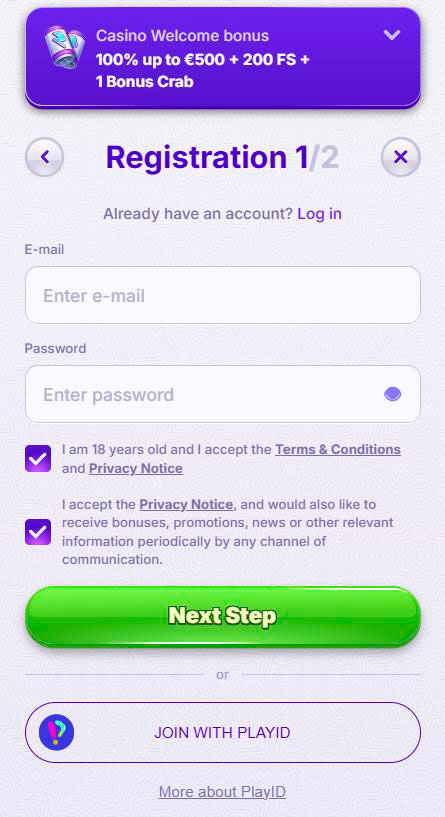
The mobile login button is right in the Robocat Casino header, so you always see “Log in” at the top of the screen on phones and tablets. After your first login, the browser will usually offer to save your credentials, so next time you are in with just a couple of taps.
If you ever forget your password, the reset flow runs through email, and when something is unclear, you always have the floating chat button at the bottom.
Support opens in an overlay on the Robocat Casino mobile site, so you do not need to jump over to the desktop to get help.
Mobile Casino Games
Now, the fun part: what exactly can you play on RoboCat mobile without an APK?
The full casino lobby is available, including slots, jackpots, live casino, Instant Games, and RoboSlot, plus extra tabs for New and Top games.
You get bottom navigation for the main sections, and once you are in Casino, you can filter by category, provider, or search by game name.
The interface is built so you can swipe through game tiles, open any title in a couple of taps, and then jump back to the lobby just as quickly.
Slots on Mobile
Slots on the RoboCat mobile site behave exactly like you would expect from a modern online casino APK.
Most providers optimise their games for mobile devices, so layouts gracefully adapt to portrait or landscape orientation.

You can jump into:
- Top, if you want the hottest games, other players are hitting right now.
- New, if you are chasing fresh releases.
- Megaways, if you are into dynamic ways to win and cascading reels.
- Bonus Buys, if you prefer buying features and free spins instead of waiting for them to trigger.
Many slots support demo mode even on mobile, so you can test mechanics and bonus rounds before risking real money.
Live Casino on Mobile
Live casino on your phone looks clean and compact, with the stream taking most of the screen and bet controls fitting naturally below or beside it.
You can play roulette, blackjack, baccarat, poker, and game shows with bonus rounds straight from your device.
If you rotate your device to landscape, things usually become even more comfortable, especially on roulette or blackjack, where you have lots of chips and actions.
Just make sure you are on a stable connection, because live streams and real-time betting rely on a consistent internet.
Instant Games
Instant and arcade-style games are basically made for mobile, since rounds are short and everything is controlled with a couple of taps.
At RoboCat, this includes crash, Plinko, dice, tower, mines, keno, wheel, and a bunch of other fast-paced titles.
Why they work so well on mobile:
- Short rounds, so you can play a few bets while waiting in a queue or during a break.
- Simple controls, usually just “Bet / Cash out” or tapping cells on a grid.
- Lightweight graphics that run smoothly even on older devices.
You will find them under Instant or Arcade in the lobby, and it is easy to switch from regular slots to these quick-fire games whenever you want.
Mobile Sports Betting
Mobile sports betting at RoboCat is laid out so you can find events fast and never miss the right button with your thumb.
You open Sports from the bottom navigation or sidebar, then choose your sport, country, league, and match.
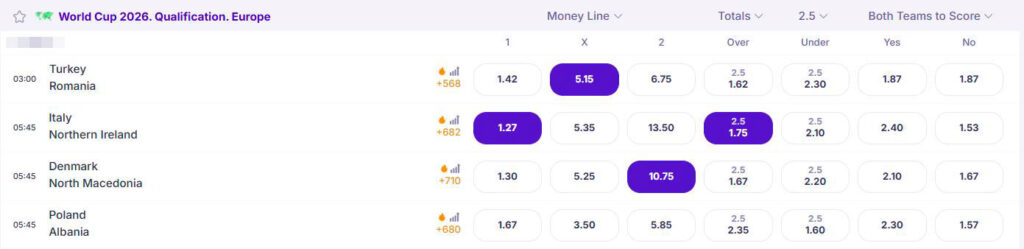
Lines and markets expand in collapsible sections, and odds are large enough to tap comfortably even on smaller screens.
Your betslip pops up at the bottom or side, where you can add selections, switch between single and combo bets, and instantly see your potential returns.
Live betting is also available on mobile. Just keep in mind that odds can update quickly, and a stable connection is your best friend here.
Mobile Payments and Withdrawals
Honestly, a lot of players barely touch desktop because the full cashier is available on mobile with the same functionality.
In the Payments area, you see the same methods, limits, and tips as on desktop, only presented in a way that fits your phone screen.
Whether you are on Android or iOS, you can top up your Robocat Casino balance, request withdrawals, activate bonuses, and track your transaction history directly from your phone.
Deposit Methods on Mobile
On the RoboCat mobile cashier, you will see:
- Bank cards are available for your region.
- E-wallets and digital payment services.
- Local payment methods depend on your country.
- Crypto deposits through our payment gateway.
It usually goes like this:
- Open the Cashier or Payments section in the menu.
- Pick your preferred method and currency, and enter your deposit amount in euros.
- Confirm the payment and complete any extra steps with your bank or wallet.
Funds typically land almost instantly, so you can jump into slots, live casino, or sports right away.
Withdrawal Processing
Requesting a withdrawal from your phone follows the exact same rules as desktop, just with bigger buttons.
You choose your withdrawal method, set the euro amount, and confirm, then your request goes to our finance team.
By RoboCat rules, the financial department processes withdrawal requests within up to 3 business days, working Monday to Friday from 6 AM to 5 PM GMT.
After approval, any additional delays depend on your bank or payment provider and are no longer under the casino’s direct control.
You also need to remember the minimum x1 turnover on deposits; if your total bets are lower than your last deposit, we may charge a 10–15 % fee from that deposit when you withdraw.
Before bigger payouts, we may ask for full KYC documents, even if you only ever played from mobile.
Conclusion
Bottom line, RoboCat Casino is fully mobile-friendly, and you do not need a separate store app to enjoy everything.
Add RoboCat to your home screen, log in from your phone or tablet, and you get the complete experience, from registration and bonuses to betting, games, and withdrawals.
If you love convenience and do not want to be stuck at a computer, the RoboCat mobile version makes the whole journey light, fast, and accessible in just a couple of taps.

FAQ
Right now, we run as a mobile web app, so you add RoboCat to your home screen through Chrome or Safari instead of downloading RoboCat from app stores.
Yes, you can activate welcome bonuses, reloads, cashback, and Bonus Crab from the mobile site, and all the same bonus terms and wagering rules still apply.
Most slots, live games, and Instant Games are mobile-ready, although a few older or region-locked titles might be unavailable or desktop only.
Your RoboCat account is universal, so your balance, bonuses, tournament progress, and bet history stay synced across desktop and mobile devices.
Yes, mobile payments go through the same secure gateways as desktop, and customer funds are held in separate client bank accounts for protection in case of insolvency.