
RoboCat Online Casino – Log In & Start Playing
If you are ready to jump into RoboCat Online Casino, you can create an account, verify it, and log in across all your devices in just a few minutes.
Getting Started with RoboCat Casino
You only need one RoboCat account to access casino games, sports, bonuses, and tournaments from desktop or mobile.
Once you register and verify your Robocat Casino details, all your balances, rewards, and settings stay synced no matter where you log in from.
Now, we will walk you through the basics, from creating your profile and passing KYC to logging in safely and keeping your account protected.
Creating Your Account
When you sign up at RoboCat Casino, you are opening a personal player account that is used only by you and registered in your real name.
You cannot share this account with others or open multiple accounts per person, address, phone, email, or IP.
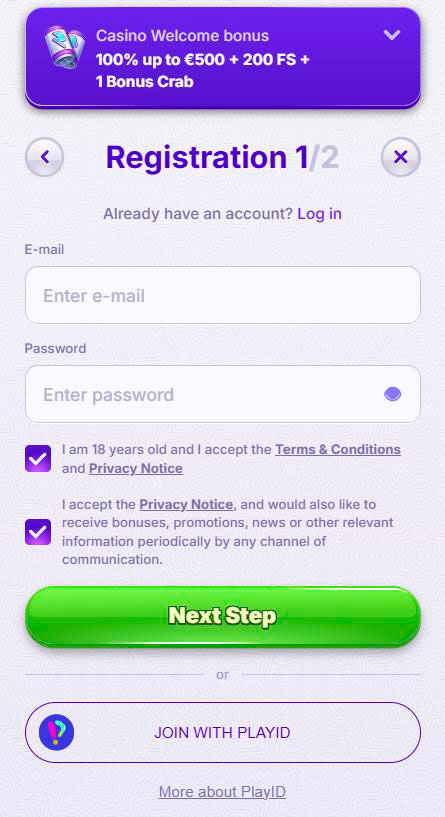
Registration Requirements
Let’s start with the basic Robocat Casino rules you need to meet before you hit the Register button.
You must:
- Be at least 18 years old and also meet the legal gambling age in your country.
- Live in a jurisdiction where online gambling at RoboCat is allowed, and you are not on the excluded countries list.
- Signing up to Robocat only for yourself, acting on your own behalf, not for someone else.
- Provide real and complete personal details in the Robocat sign-up form and keep them updated later.
If you live or stay in one of the excluded jurisdictions, you agree not to open or use an account and to close it immediately if you already have one.
Account Credentials Setup
During signing up to Robocat, you will choose your login details, which you will use every time you access Robocat Casino.
Your username and password must be kept secret, and any action done with the correct credentials is treated as done by you.
You should:
- Pick a unique username that clearly belongs to you.
- Create a strong password and never share it with anyone, including friends or “tipsters”.
- Avoid reusing passwords from other sites to reduce the risk of compromise.
- Update your profile data right away if something changes, for example, your address or email.
Bottom line, you are fully responsible for all bets and transactions made with your Robocat Casino login, so treat those details like your bank PIN.
Email Verification and KYC Process
Now, once your account is created, you may need to confirm your contact details and complete KYC checks so we can keep everything safe and compliant.
We can ask you for documents at any time, both before and after deposits or withdrawals, to verify identity, age, residence, and payment methods.
If we request documents and information, you have 30 days to provide them; otherwise, we can suspend payments and even close the account.
Identity Verification Documents
For identity checks, we can ask you to send clear copies of government-issued documents.
These are used to confirm your name, age, and that it is really you using the account.
Typical ID documents include:
- Passport (photo page).
- National identity card.
- Driving licence with photo.
If needed, we may also use extra checks like phone calls, face verification, or other tools as part of our security and anti-fraud procedures.
Proof of Address and Payment Methods
Besides your ID, we also need to know where you live and that the payment methods you use actually belong to you.
We may request:
- Proof of residence, for example, a utility bill, bank statement, or rental agreement showing your name and address.
- Proof of ownership and transaction history for payment methods used, such as card statements or e-wallet screenshots.
- Extra documents when we review refunds, chargebacks, or larger withdrawals.
If your payment details look suspicious or do not match your account data, we can block accounts, void winnings, or report activity to relevant authorities.
Verification Timeline
Let’s talk timing, because we know you want to start playing and withdraw smoothly.
- You must send all requested KYC documents within 30 days after we ask for them.
- We usually verify documents within 10 days once everything is submitted, although complex cases can take longer.
- We can delay withdrawals while we complete these checks, especially for big payouts or suspicious activity.
Once Robocat verification is done and everything matches, your account will run much smoother and withdrawals will be processed according to our standard timelines.
Logging In to Your Account
Now that your Robocat account is created, logging in is straightforward, whether you use a desktop or a mobile device.
You just open Robocat.com, tap “Log in”, enter your details, and you are back into the lobby with your balance and games ready to go.
You must never log in to Robocat using someone else’s credentials or let them use yours, because this is a direct breach of our Terms.
Join with PlayID
If your region supports PlayID or a similar unified login, you can use it to access RoboCat Casino and other connected products with one identity.
This makes switching between casino, RoboSlot, and other features smoother, while still respecting all KYC and security requirements.
In practice, you:
- Create or connect your PlayID once, then use it as your main login method.
- Keep the same verified personal data across all linked services.
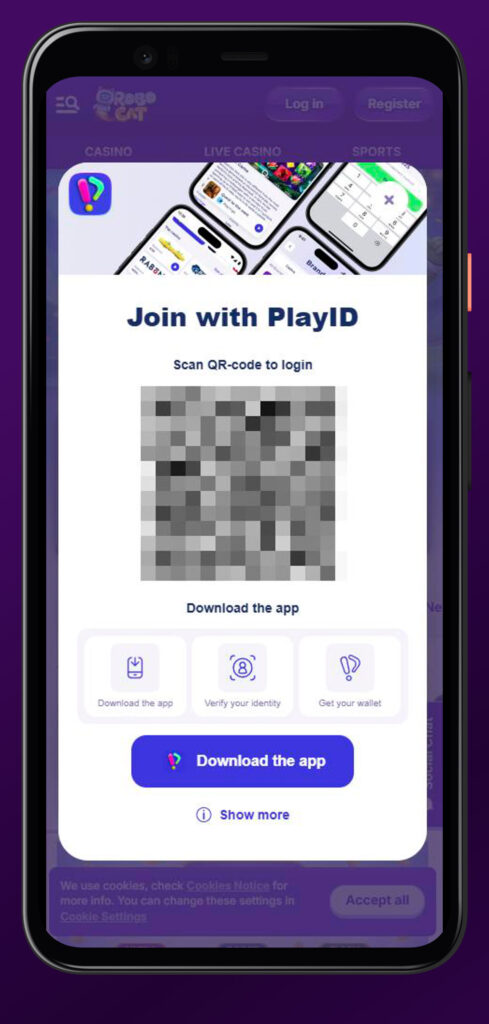
All standard RoboCat rules still apply, including one account per person and full responsibility for any activity under that ID.
Username and Password Management
Your Robocat Casino login username and password are the keys to your account, so how you handle them really matters.
We treat any Robocat Casino login with correct details as if you personally performed every bet and transaction.
For better safety:
- Do not write your password where others can see it or save it on shared devices.
- Change your password if you suspect someone else might know it.
- Never sell, transfer, or “rent” out your account or balance to anyone.
If we see attempts to buy or sell accounts, transfer balances, or otherwise trade access, those accounts can be closed and winnings voided.
Account Recovery Options
If you lose access to your password or forget your Robocat login details, you still have a way back in.
You can use standard recovery options via your registered email and then contact support if extra help is needed.
Recovery usually involves:
- Password reset via a secure link sent to your registered email.
- Additional identity questions or document checks if there is any doubt that you are the real owner.
- Contact support@robocat.com from your registered email if you cannot recover the account with automated tools.
We may refuse to restore access if we cannot safely verify that you are the legitimate account holder.
Multiple Device Access
Big plus, you can use the same RoboCat account on multiple devices, like your laptop, phone, and tablet.
Your balance, bonuses, and game history sync across all platforms as long as you log in with the same Robocat details.
Keep in mind:
- You must not share that access with other people, even if they use your device.
- You should log out of shared computers or public devices once you finish playing.
- If suspicious logins from different devices appear, we may perform extra checks or temporarily block the account.
Account Security Features
Now, let’s talk about how we help you keep your RoboCat account safe while you focus on playing.
We mix secure connections, strict Robocat Casino login rules, and verification checks so your funds and personal data stay protected.
Password Protection
Your password is your first and most important security feature.
We expect you to keep it confidential and treat any access with your correct credentials as valid.
On our side:
- We run the site on encrypted connections over a protected network to shield sensitive data.
- We can perform additional security checks when something unusual happens.
On your side, choosing a strong, unique password and not sharing it with anyone is the best way to prevent unauthorized access.
Session Control
Session control is about how and when your account stays logged in and what we do if something looks off.
If we suspect fraud, collusion, money laundering, or account sharing, we can take action fast.
Possible actions include:
- Immediately blocking access and freezing withdrawals while we investigate.
- Closing the account permanently and confiscating balances if we confirm serious violations.
- Running gameplay reviews and extra KYC checks when patterns look abusive or irregular.
You can also ask support to close or self-exclude your account if you want to stop playing for any reason.
Conclusion
Bottom line, when you create and log into your RoboCat Casino account, you get a single, secure profile that works across all devices and products.
If you follow the rules, keep your credentials safe, and complete KYC on time, you will enjoy smooth Robocat logins, fast payments, and a stable gaming experience with us.

FAQ
Yes, you must be at least 18 and also meet the legal gambling age in your own jurisdiction.
No, only one account per person, household, phone, email, and IP address is allowed, and duplicates can be closed and voided.
We may ask for a certified ID, proof of residence, and proof of ownership for your payment methods, plus extra checks if needed.
Once you send all the requested documents, we usually review them within 10 days, but complex cases can take more time.
Yes, you can log in from multiple devices with the same credentials, and your balances and bonuses stay synced across them.
We can withhold payments, suspend your account, and eventually close it if you do not provide the requested documents within 30 days.